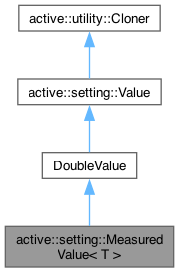
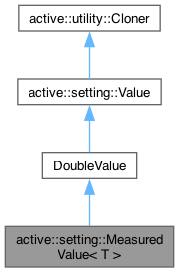
Template specialisation of DoubleValue for values of measurement. More...
#include <MeasuredValue.h>
Public Types | |
| using | Type = typename T::Type |
| using | UnitRetrieval = std::function<T()> |
| Function retrieving a measument unit. | |
 Public Types inherited from active::setting::Value Public Types inherited from active::setting::Value | |
| enum class | Status { undefined = 0 , bad , good } |
| The value status (defines whether a value has been explicitly set and (if so) if it's meaningful. | |
| enum class | Type { null = 0 , boolType , idType , intType , floatType , stringType , timeType } |
| Supported value types (broad groups, e.g. int32_t and int64_t are both intType) | |
| using | Unique = std::unique_ptr<Value> |
| Unique pointer. | |
| using | Shared = std::shared_ptr<Value> |
| Shared pointer. | |
| using | Option = std::optional<Value> |
| Optional. | |
Public Member Functions | |
| MeasuredValue () | |
| MeasuredValue (double val) | |
| MeasuredValue (const T &unit, double val=0.0) | |
| MeasuredValue (UnitRetrieval unitFinder, double val=0.0) | |
| Value & | operator= (const utility::String &val) override |
| operator utility::String () const override | |
| virtual utility::String | operator() (const T &unit) const |
| virtual T | getUnit () const |
| virtual void | setUnit (const T &unit) |
| virtual void | setUnit (UnitRetrieval unitFinder) |
| virtual Value & | assign (const utility::String &val, const T &unit) |
| virtual Value & | operator= (const Value &val) override |
| virtual Value & | operator= (bool val) override |
| virtual Value & | operator= (int32_t val) override |
| virtual Value & | operator= (uint32_t val) override |
| virtual Value & | operator= (int64_t val) override |
| virtual Value & | operator= (double val) override |
| virtual Value & | operator= (const active::utility::String &val) override |
| virtual Value & | operator= (const char *val) override |
| virtual Value & | operator= (const active::utility::Guid &val) override |
| virtual Value & | operator= (const active::utility::Time &val) override |
| Value & | operator= (const Value &val) |
| Public Member Functions inherited from active::setting::ValueBase< T > | |
| ValueBase () | |
| ValueBase (const T &val, Status stat=good) | |
| ValueBase (const Value &value) | |
| ValueBase (const utility::String &stringVal) | |
| ValueBase (const ValueBase &source)=default | |
| virtual Value * | clonePtr () const override |
| virtual bool | operator== (const Value &ref) const override |
| bool | operator!= (const Value &ref) const |
| virtual bool | operator< (const Value &ref) const override |
| virtual | operator bool () const override |
| virtual | operator int32_t () const override |
| virtual | operator uint32_t () const override |
| virtual | operator int64_t () const override |
| virtual | operator double () const override |
| virtual | operator active::utility::String () const override |
| virtual | operator active::utility::Guid () const override |
| virtual | operator active::utility::Time () const override |
| virtual bool | isNull () const override |
| virtual Type | getType () const override |
| virtual void | setDefault () override |
| Value & | operator= (const Value &val) |
| Public Member Functions inherited from active::setting::Value | |
| Value (Status stat=good) | |
| virtual | ~Value ()=default |
| bool | operator!= (const Value &ref) const |
| virtual bool | isGood () const |
| Public Member Functions inherited from active::utility::Cloner | |
| virtual | ~Cloner ()=default |
Additional Inherited Members | |
| Static Public Member Functions inherited from active::setting::Value | |
| static std::optional< Type > | typeFromName (const utility::String &text) |
| static utility::String | nameForType (Type type) |
| Public Attributes inherited from active::setting::ValueBase< T > | |
| T | data = T() |
| The value data. | |
| Public Attributes inherited from active::setting::Value | |
| Status | status |
| The value status. | |
Detailed Description
class active::setting::MeasuredValue< T >
Template specialisation of DoubleValue for values of measurement.
Targets measurement properties (dimensions) like length, volume, area etc. where the formatting is expected to be a numeric value suffixed with an abbreviation of the unit of measurement, e.g. 100mm. The measurement formatting will specify the unit type and precision. Refer to the Unit template for more detail.
Restrict use of this template to values that express measured properties rather than as a catch-all for formatted quantities. It is assumed (for example) that there is a fixed conversion factor between any measurement unit of the same kind, so values can be stored internally as a homogenous unit type and converted on the fly for string representations.
Conversion of measured values should only be done for the purposes of string representation, e.g. for the user to read/edit. Otherwise, all coding should assume a fixed unit type, e.g. lengths are always in metres. Interactions with external software should convert to/from that software's native units only when reading/writing data from/to that software, and knowledge of the conversion factor should as limited as possible. This approach keeps code managing measurements as simple as possible (and will elminate the possibility of a host of errors).
Some coding examples follow using LengthValue to illustrate how measurements should be handled in practice. AreaValue and VolumeValue work in exactly the same way (with relevant units).
LengthValue holds values in metres, so can be constructed with a length of 3 metres as follows:
LengthValue width{3.0};
A string can be extracted from the value:
String output{width}; //output becomes 3m
The measurement unit can be changed to suit user requirements:
width.setUnit({foot, inch, 6, true});   //Set the unit to foot/inch, precision 1/64", fractional output
output = width; //output becomes 9' 10 7/64"
A custom unit can also be used to retrieve a value without knowing or changing the formatting it contains:
LengthValue width{3.1234};  //Default unit is metres to 4 decimal places
String output = width;  //…which produces: 3.1234m
output = width({foot, inch, 6, true});  //But with a custom unit: 10' 2 31/32"
output = width({mm, 1});    //Or alternately: 3123.4mm
The unit can have some bearing on the conversion of text to a measurement, but only when no units are explicitly stated. For example, if a LengthValue unit is decimal feet and text is assigned to it with no units, it will assume the figure is decimal feet:
LengthValue width{{foot, 4}};   //Length unit is decimal feet
width = "3";    //Text has no unit, so assumed to be decimal feet
String output{width({metre, 4})};   //But can then be output as metres (or any other unit); output is 0.9144m (= 3 feet)
However, the member unit is ignored if the text has explicit units:
LengthValue width{{metre, 4}};  //Length unit is metres
width = "3' 6 1/2\"";   //This text is formatted as feet and fractional inches, and is interpreted as such
String output{width};   //So the resulting output is 1.0795m (= 3' 6 1/2")
Units (of the same type, e.g. length) can be freely mixed in input, e.g. 3m 4" will be intrepreted as "3 metres + 4 inches" = 3.1016m. Any series of numbers (separated by white space) will be interpeted as being the same unit type and added together, so 4 6" will be read as "4 inches + 6 inches", i.e. it will not assume that the space implies feet. If the number is intended to be "4 feet + 6 inches" it should be explicitly entered as 4'6".
The unit for a MeasuredValue can be sourced from the member variable or (optionally) a specified retrieval function. The latter could be used in cases where multiple instances must independently react to a common change, e.g. the UI refreshing displayed measurements in response to the user changing their preferred unit/formatting, e.g. if we have some function that returns the users formatting preferences:
LengthUnit preferredLengthUnit() {
    ...Some process to retrieve and return the preferred length unit
}
…it can be used to ensure a refresh always reflects the current preferences:
LengthValue width{preferredLengthUnit};
Constructor & Destructor Documentation
◆ MeasuredValue() [1/4]
|
inline |
Default constructor
◆ MeasuredValue() [2/4]
|
inlineexplicit |
Constructor
- Parameters
-
val The measurement value
◆ MeasuredValue() [3/4]
|
inlineexplicit |
Constructor
- Parameters
-
unit The measurement unit val The measurement value
◆ MeasuredValue() [4/4]
|
inline |
Constructor
- Parameters
-
unitFinder A function to retrieve the preferred unit val The measurement value
Member Function Documentation
◆ assign()
|
inlinevirtual |
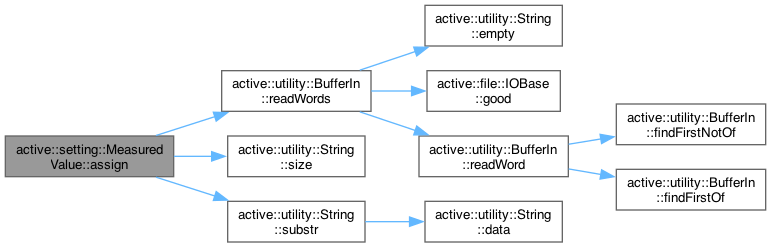
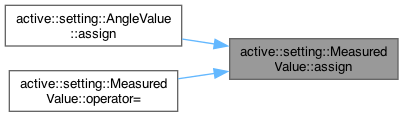
Assign a measurement value as a string
- Parameters
-
val A string value to assign unit The input unit
- Returns
- A reference to this
Reimplemented in active::setting::AngleValue.
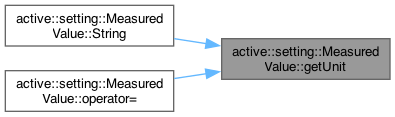
◆ getUnit()
|
inlinevirtual |
Get the measurement unit
- Returns
- The measurement unit
◆ operator utility::String()
|
inlineoverride |
Get a string value
- Returns
- A string value

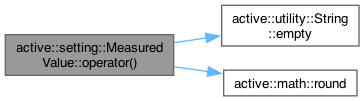
◆ operator()()
|
inlinevirtual |
Get a string value
- Returns
- A string value
Reimplemented in active::setting::AngleValue.

◆ operator=() [1/12]
|
inlineoverridevirtual |
Assignment operator
- Parameters
-
val A boolean value to assign
- Returns
- A reference to this
Reimplemented from active::setting::ValueBase< T >.
◆ operator=() [2/12]
|
inlineoverridevirtual |
Assignment operator
- Parameters
-
val A guid value to assign
- Returns
- A reference to this
Reimplemented from active::setting::ValueBase< T >.
◆ operator=() [3/12]
|
inlineoverridevirtual |
Assignment operator
- Parameters
-
val A string value to assign
- Returns
- A reference to this
Reimplemented from active::setting::ValueBase< T >.
◆ operator=() [4/12]
|
inlineoverridevirtual |
Assignment operator
- Parameters
-
val A time value to assign
- Returns
- A reference to this
Reimplemented from active::setting::ValueBase< T >.
◆ operator=() [5/12]
|
inlineoverridevirtual |
Assignment operator
- Parameters
-
val A string value to assign
- Returns
- A reference to this
Reimplemented from active::setting::ValueBase< T >.
◆ operator=() [6/12]
|
inlineoverridevirtual |
Assignment operator
- Parameters
-
val A string value to assign
- Returns
- A reference to this
Reimplemented from active::setting::ValueBase< T >.
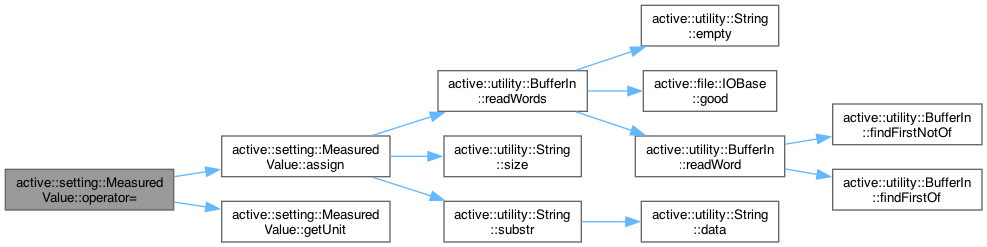
◆ operator=() [7/12]
|
inlinevirtual |
Assignment operator
- Parameters
-
val A value to assign
- Returns
- A reference to this
Reimplemented from active::setting::ValueBase< T >.
◆ operator=() [8/12]
|
inlineoverridevirtual |
Assignment operator
- Parameters
-
val A value to assign
- Returns
- A reference to this
Reimplemented from active::setting::ValueBase< T >.
◆ operator=() [9/12]
|
inlineoverridevirtual |
Assignment operator
- Parameters
-
val A double precision value to assign
- Returns
- A reference to this
Reimplemented from active::setting::ValueBase< T >.
◆ operator=() [10/12]
|
inlineoverridevirtual |
Assignment operator
- Parameters
-
val A 32-bit integer value to assign
- Returns
- A reference to this
Assignment operator
- Parameters
-
val A boolean value to assign
- Returns
- A reference to this
Reimplemented from active::setting::ValueBase< T >.
◆ operator=() [11/12]
|
inlineoverridevirtual |
Assignment operator
- Parameters
-
val A 64-bit integer value to assign
- Returns
- A reference to this
Reimplemented from active::setting::ValueBase< T >.
◆ operator=() [12/12]
|
inlineoverridevirtual |
Assignment operator
- Parameters
-
val An unsigned 32-bit integer value to assign
- Returns
- A reference to this
Reimplemented from active::setting::ValueBase< T >.
◆ setUnit() [1/2]
|
inlinevirtual |
Set the measurement unit
- Parameters
-
unit The measurement unit (NB: A specified unitFinder function will take precedence over this setting)
◆ setUnit() [2/2]
|
inlinevirtual |
Set a unit retrieval function
- Parameters
-
unitFinder The measurement unit retrieval function (nullptr = use member unit)
The documentation for this class was generated from the following file:
- /Users/rwessel/Documents/Development/ActiveLib/Active/Setting/Values/Measurement/MeasuredValue.h